
Windfinder Pro: Wind & Weather
WindfinderWeather
4.7291.00 Reviews
- Version
- 3.39.3
- Installs
- 100.00K
- Age Rating
- Everyone
Screenshots
Our Review of Windfinder Pro: Wind & Weather
 Analysis by Appyee
I judge a specialist weather app by whether its information helps me make a better decision, not by how many numbers it can fit on a screen. Windfinder Pro: Wind & Weather is built around wind conditions, so it makes most sense when a forecast affects what you can safely or comfortably do outside. It is a weather app from Windfinder for people planning activities such as sailing, surfing, kiteboarding, fishing, or simply spending time somewhere exposed to the elements. I find that focus useful, though it is more than many people need for checking whether to take an umbrella.
What the price tells you—and what it doesn’t
The listed price for Windfinder Pro is $12.99, while in-app purchases are shown at $0.99–$9.49 per item. Those are distinct purchase details, and I would not treat the in-app purchase range as the cost of Pro itself. The practical question is whether the wind-centred information suits your plans often enough to justify paying for this particular app.
Windfinder also has a free version, but I would check what is available in the version offered to you before assuming that every feature discussed here is included without payment. The paid edition is the one I would consider if I regularly plan around wind and want a dedicated forecasting tool. For occasional, general-purpose weather checks, paying for a specialist app may be harder to justify.
Why Windfinder Pro is a Game-Changer
Windfinder Pro isn’t just your run-of-the-mill weather app. It’s specifically designed for those of us who need detailed wind and weather conditions. You know, the kind of detail that can make or break an outdoor plan. The app offers high-resolution forecasts, which means you get a precise outlook that’s incredibly useful for planning.
One of the first things I noticed is the app’s interface. It’s clean and intuitive, which means you’re not fumbling around trying to find the information you need. Everything is right there at your fingertips. Plus, it’s packed with features that cater to both amateurs and professionals alike.
Key Features to Explore
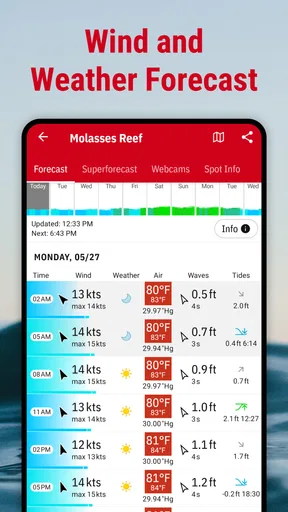
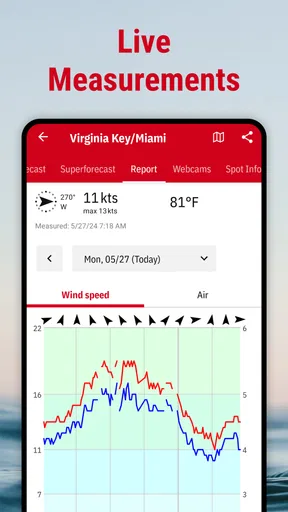
Let’s talk features. The app provides hourly updates for wind speed, direction, and gusts, which is a godsend for anyone who’s ever been caught off guard by a sudden gust. You also get information on wave height, air pressure, and even tide charts. It’s like getting a full weather station right in your hand.
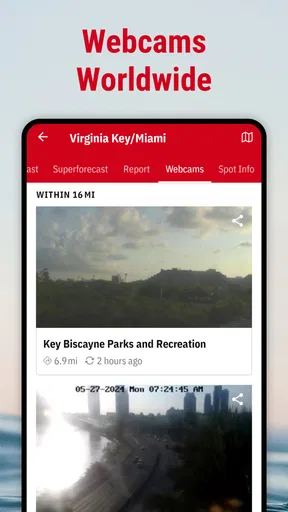
The global coverage is impressive. Whether you’re in a bustling city or on a remote beach, Windfinder Pro has got you covered. The app also offers a neat feature called the "Superforecast," which uses supercomputing technology for even more precise wind forecasts. If accuracy is your thing, this feature is a goldmine.
"Having the Superforecast option feels like a luxury, giving me confidence in my outdoor plans."
Usability and Performance
In terms of usability, the app is super responsive. Whether I was checking forecasts or browsing different locations, everything loaded smoothly. There’s a bit of a learning curve if you’re not used to detailed weather data, but the app does a great job of not overwhelming you. It’s all about balance.
Notifications are another aspect where this app shines. You can set up alerts for specific weather conditions, so you’re always in the know. This feature is particularly handy if you’re planning a day outdoors and need to keep an eye on changing conditions.
Making the forecast work for your plans
The most useful way I’ve found to approach a wind forecast is to look at the trend, not fixate on a single reading. Wind speed, direction, and gusts answer different questions: whether a spot looks active, whether the direction works for your activity, and whether sudden stronger bursts could make the outing uncomfortable. I would check the hourly sequence before leaving, then look again closer to the time I plan to set out. That gives me a better basis for adjusting a plan than treating one forecast number as a promise.
For example, imagine choosing whether to take a small boat out after work. I would compare the expected wind direction and gust pattern over the hours I expect to be on the water, rather than only checking the conditions at the time I open the app. If the wind builds later, that could change how long I stay out or whether I postpone the trip. This is the kind of decision where a specialised forecast earns its place; it is not a substitute for local safety guidance or sound judgement.
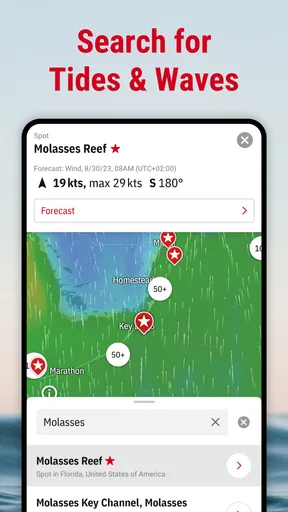
Wave height and tide information can add context for coastal plans, but I would use them as pieces of a decision rather than as a complete account of local conditions. A forecast can help me decide what to investigate and when to check again. People heading onto the water still need to account for the location, their experience, and conditions on the day.
Customization and Personalization
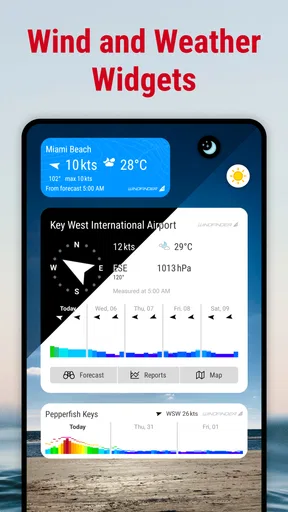
Customization is another strong suit. You can tailor the app to display the information that’s most relevant to you. For example, if you’re only interested in wind conditions, you can set your dashboard to focus on that. It’s these small touches that make the app feel personalized and user-friendly.
Plus, the app lets you save your favorite spots, so you’re never more than a tap away from checking the conditions at your go-to locations. It’s these thoughtful features that keep you coming back.
Saved locations are especially useful when your decisions involve comparing familiar places. I would keep a regular launch point and a backup location together, then check whether the forecast makes one a more sensible choice that day. That is a practical advantage over searching from scratch each time, and it can turn a quick check into a repeatable routine. The same approach works for a fishing spot and a nearby alternative, or for comparing a local beach with a more sheltered one.
There is a trade-off to that convenience: a saved place is only useful if it represents the spot you actually care about. Conditions can differ across a coastline or around local terrain, so I would choose locations carefully and avoid assuming that a forecast for a nearby area exactly describes my intended launch or shoreline. If I am unfamiliar with a location, I would treat the app as a planning aid and seek local knowledge as well.
Where a specialist forecast helps—and where it doesn’t
Compared with a typical general weather app, Windfinder puts more attention on wind-related planning and adds information such as gusts, waves, and tides. That focus can be valuable to someone deciding whether a session is workable, while a broad weather app may be quicker for everyday questions such as the chance of rain during a walk. I would not replace a familiar all-purpose forecast automatically; I would use Windfinder when wind is the deciding factor and keep a general forecast handy for the wider picture.
The same distinction matters for casual users. If I only want a quick glance at the day’s temperature or a simple rain outlook, the extra detail can feel like clutter rather than a benefit. On the other hand, a sailor, surfer, or kiteboarder who repeatedly checks wind direction and gusts may get more practical value from a specialist layout than from a general forecast screen. The right choice depends less on how serious someone sounds and more on whether those details actually change their plans.
One useful habit is to decide in advance which conditions would make you switch locations, delay, or cancel. Then the app’s forecast becomes a decision aid rather than an endless stream of numbers to interpret. I would also avoid letting notifications make the decision for me: an alert can prompt a fresh check, but it cannot account for every local circumstance or replace a careful assessment at the site.
Windfinder Pro is rated Everyone, so its stated content rating is suitable for a broad audience. That does not mean the information is equally useful to every age or experience level: anyone new to wind sports may still need help understanding what the readings mean for their activity. I would encourage beginners to learn how their chosen sport interprets wind and gust conditions rather than assuming the app itself teaches that judgement.
Customization and Personalization
Customization is another strong suit. You can tailor the app to display the information that’s most relevant to you. For example, if you’re only interested in wind conditions, you can set your dashboard to focus on that. It’s these small touches that make the app feel personalized and user-friendly.
Plus, the app lets you save your favorite spots, so you’re never more than a tap away from checking the conditions at your go-to locations. It’s these thoughtful features that keep you coming back.
Subscription and Value
Now, let’s talk about the subscription model. While the basic version of Windfinder is free, the Pro version comes with a small fee. But trust me, the value you get from the premium features more than justifies the cost. With everything from ad-free browsing to the Superforecast, it feels like money well spent.
That said, I would make the purchase based on my own use rather than the promise of having more data. The $12.99 price is easiest to defend if I expect to return to the app for outings where wind forecasts genuinely shape the plan. If I only check it before a rare beach day, a free weather option may be enough. The in-app purchase range is separate from that listed Pro price, so I would review the purchase choices shown in the app and decide whether any are relevant before spending more.
The app has a 4.7 average from around 15,000 ratings, and it has over 100,000 installs. Those figures suggest that many people have chosen it, but popularity alone would not settle the decision for me. I would weigh the specialist focus against how often I need wind detail. Windfinder is the developer, and the app has been available since June 15, 2010; its current version is 3.39.0, with Android 7.0 as the minimum operating system requirement. Those details may help with basic compatibility checks, but the actual value still comes down to the way I use it.
Overall, Windfinder Pro: Wind & Weather is a solid investment for anyone serious about staying ahead of the weather. Whether you’re a sailor, surfer, or someone who simply loves the outdoors, this app provides a reliable and detailed forecast that’s hard to beat.
So, if you’re looking for an app that delivers precise, real-time weather insights, give Windfinder Pro a try. It might just become your new favorite weather companion.
My buy-or-skip judgement
I would buy it if wind is a regular part of my decisions, especially when I want to compare familiar locations, check how conditions may change over the day, or plan a water-based outing. The combination of hourly wind detail, saved spots, alerts, and the Superforecast gives this specialist app a clear role in that routine. Its strongest value is not that it can make the weather certain, but that it helps me ask better questions before committing to a plan.
I would skip the paid edition if I mainly need ordinary forecasts, rarely go to wind-exposed places, or prefer a simple screen with minimal interpretation. A general weather app is likely the more convenient everyday choice in those cases. For a person who sails, surfs, fishes, or kiteboards regularly, though, the focused information can justify the price more readily. My recommendation is to try the free version first if it meets your needs, then pay only if the Pro experience answers questions you actually face.
Verdict
Strengths of Windfinder Pro: Wind & Weather
- Accurate wind forecasts for multiple locations.
- User-friendly interface with easy navigation.
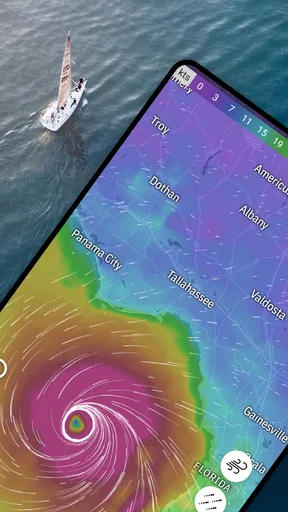
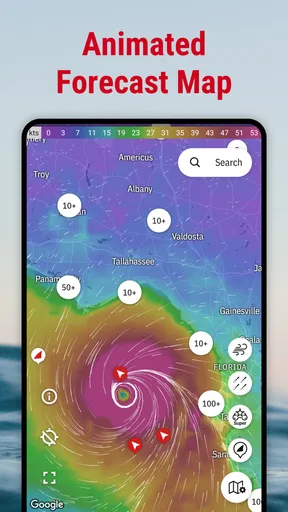
- Detailed weather maps and charts available.
- Offline mode for on-the-go accessibility.
- Customizable alerts for weather changes.
Limitations of Windfinder Pro: Wind & Weather
- Requires payment for the Pro version.
- Limited features in the free version.
- Occasional delays in weather updates.
- No social sharing options available.
- Heavy battery usage during constant updates.
Other Releases by Windfinder
View All
Windfinder: Wind & Weather map
Weather4.6
Similar Picks in This Category
View All
Weather - By Xiaomi
Xiaomi Inc.4.1

Weather & Radar Forecast
WetterOnline4.8

Weather
OneLouder Apps4.6

AccuWeather: Weather Radar
AccuWeather3.6

The Weather Channel - Radar
The Weather Channel4.6

1Weather Forecasts & Radar
OneLouder Apps4.3
Frequently Asked Questions
What features does Windfinder Pro offer compared to the free version?
Windfinder Pro offers several advanced features not available in the free version. These include detailed wind forecasts, high-resolution weather maps, and the ability to view data for more locations worldwide. Additionally, it provides ad-free usage, making the experience smoother and more enjoyable for users who need precise weather updates.
Is Windfinder Pro accurate for planning outdoor activities?
Yes, Windfinder Pro is highly regarded for its accuracy in weather forecasting, which is crucial for planning outdoor activities like sailing, surfing, or hiking. The app provides hourly updates and detailed data on wind speed, direction, and temperature, helping users make informed decisions based on reliable information.
How user-friendly is the Windfinder Pro interface?
Windfinder Pro is designed with a user-friendly interface that is easy to navigate. It features intuitive design elements like customizable weather maps and a clean layout. Users can quickly find and interpret the data they need, making it accessible even to those not familiar with complex meteorological information.
Does Windfinder Pro require an internet connection to work?
While Windfinder Pro can work offline to some extent, an internet connection is necessary to download the latest weather updates. Users should ensure they have access to Wi-Fi or mobile data to make the most out of the app's real-time forecasting capabilities and to ensure accuracy of the information provided.
Can I customize notifications in Windfinder Pro?
Yes, Windfinder Pro allows users to customize notifications according to their preferences. You can set alerts for specific weather conditions, such as wind speed thresholds or temperature changes. This feature is particularly useful for users who need timely updates to adjust their plans based on changing weather conditions.
